|
Classic Star Trek Ships
High Resolution Pictures
for Posters
Any of the pictures shown on this web
site can be used to print High Resolution Posters. The High
Resolution Digital images will be provided in two sizes:
- 2400 by 3000 by 24 bit color
pixels to print 4:5 aspect ratio posters.
Used when printing 8x10, 11x14, 16x20, 20x24 or 24x30 inch posters.
- 2400 by 3600 by 24 bit color
pixels to print 2:3 aspect ratio posters.
This image has the background extended to print 20x30 or
24x36 inch posters.
Each image is approximately 1 to 3 megabytes
in their compressed ".jpg" format In there raw form they
were 22 to 26 megabytes each. That is 4 times
larger than the images on the CD. They can be used to print posters of
the following sizes:
|
Poster Size: |
Pixels per Inch:
(See Note 1 below) |
| 8 by 10 inches |
300 (best
quality, but much more than you need) |
| 11 by 14 inches |
214 (must crop
slightly. See Note 3 below) |
| 16 by 20 inches |
150 (optimal
size; this is the best size to print) |
| 20 by 24 inches |
125 (must crop
slightly. See Note 3 below) |
| 20 by 30 inches |
120 (best
quality for the
2:3 extended image) |
| 24 by 30 inches |
100 (high
quality. See Note 2 below) |
| 24 by 36 inches |
100 (high
quality. Use the
2:3 extended image) |
Printing Posters larger than 24 by 36 inches (less than 100 Pixels
per Inch or 300 Dots per Inch) is not recommended.
How it Works:
Send an E-mail to tom@fl-ink.com
with the "Description Field" from each of the pictures you want posters of.
You can select any picture from the Gallery.
Just "Copy"
("Cut" won't work) the "Description Field" found with each
picture and "Paste" it into the E-mail to let me know which picture
you want.
The cost for each picture (2 images)
is $8.00.
The images can be sent over the Internet, free of any additional charge or they
can be placed on a CD and mailed to you for an additional fee.
How do I print the Posters and what does it cost?
I can print 16 by 20
and 20 by 30 inch posters and mail them to you if you wish or you can have
them printed yourself. I print my high resolution 16 by 20 and 20 by 30 inch posters at the
local CostCo for $9.99 each. I send the image over the internet and
pick them up an hour or so later. Wal-Mart, Target, most Drug and
Office Supply stores provide a similar service. You can also have your
posters printed on-line at one of the hundreds of web sites
that print pictures. You simply send the image over the Internet to the
site and order the size poster you want.
Click here to Order Pictures.
Note 1
: What
is the difference between "Pixels per Inch" and "Dots per
Inch"?
Printers generally convert ppi to dpi by multiplying by the number of
dots printed per pixel, so 3 color printers will print 100 ppi at 300 dpi, 4 (3
colors + black) at 400, 6 at 600 dpi and 7 at 700 dpi. Most professional
printers will print at the high end of the scale from 600 to 1200 dpi.
Note 2: It's hard to find a printing
service that will print individual 24 by 30 inches pictures any more.
Most only print volume posters in this size; however, you can print a 24 by 36
inch posters and trim the edges to fit your frame. Just ask for a 24
by 30 inch picture that has been padded to 24 by 36 as seen in the small
pictures in Note 3 below.
Note 3: What
is "Aspect Ratio", "Crop" and "Pad" and why do I care?
The Aspect Ratio is the ratio between the height and the width of the
picture. All of
the Classic Star Trek Ship pictures come in two sizes:
- 2400 by 3000 by 24 bit color
pixels to print 4:5 aspect ration pictures.
Used when printing 8x10, 11x14, 16x20, 20x24 or 24x30 inch posters.
- 2400 by 3600 by 24 bit color
pixels to print 2:3 aspect ration pictures.
Used to print 20x30 or 24x36 inch posters.
Because of this you will only
have to crop or pad an image to print certain specialty sizes such as 20
by 25 or 24 by 30. Other sizes such as 11 by 14 and 20 by 24 will be
cropped slightly, so make sure you inspect the image carefully before
having the poster printed.
- Crop - part of the print can
be trimmed from the top and/or
bottom or from the left and/or right so that the image is not distorted; i.e. squished or stretched
out. Just make sure that you don't cut any of the important elements
in the picture. Look very closely at all four sides of the cropped
image to make sure you didn't cut off part of a ship.
- Pad - padding can be added to the right and left sides so the full image is centered on the
picture. Printing an 8 by 10 inch image onto a 20 by 30 print will yield a 20
by 25 inch picture after trimming. A 24 by 36 inch print will
yield a 24 by 30 inch picture after trimming.
Any good photo shop can show you what the finished picture will
look like after it is printed. If you order online, make sure you see
the cropped image before ordering. If you need help with cropping or padding,
just let me know what size you will be printing and I will pad, crop or extend the
image for you.
 |
 |
 |
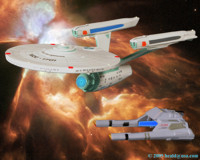
| Normal 4:5 Aspect Ratio |
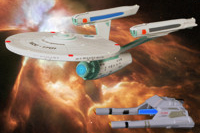
Cropped to 2:3 Aspect Ratio
|
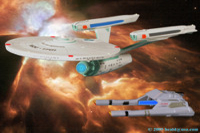
Squished
|
 |
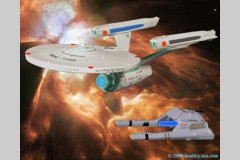 |
|
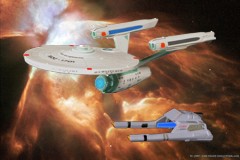
Full 2:3 Aspect Ratio image with the background Extended to 2400 by 3600 PPI. |
Padded to
print a 4:5 Aspect Ratio image onto a 2:3 Aspect Ratio poster. |
|
Copyright © Notice
You can install the images onto a single computer for your personal, non commercial
use. You can print the images any number of times for your personal, non commercial use. Do
not copy, post or distribute the images in any other way. The following copyrights
apply.
All of the original names, images and objects are Copyrighted © by their various
owners: Paramount Pictures, Hallmark, Micro Machines, Galoob, Furuta, Playmates, Polar
Lights, Playing Mantis and NASA. The resulting compositions are
Copyrighted © by Freelance Ink and Tom Heald. All rights reserved.
|

[ Top
| Home
| Gallery
| Ships CD
| Poster Art
| Order
]
Copyright © 1999-2013 by Freelance Ink.
All Rights Reserved.
|
|

Free counter provided by Andale.com on Aug. 04, 2005.
|